
Exsion365 vs Power BI for Business Central reporting: what each takes to go live, where each wins, and a one-week test to run on your own data.
Somebody in IT points out that Power BI is already licensed, so the Business Central reporting question should be settled. Three weeks later the finance team still has no report it trusts, the developer who owns the data model has moved to another project, and the controller is exporting to Excel again. Nothing went badly wrong, exactly. The plan just measured the wrong thing.
Most tool comparisons ask which platform is more powerful. A finance team about to close the month is asking something narrower: how soon can we see our own numbers, and how quickly can we change them when the CFO wants one more cut? On that question Excel with Exsion is usually live in about an hour, while a Power BI app needs parameters set, a job queue run and a refresh schedule before it shows your figures, and every later change goes back to whoever owns the model. Power BI wins once the report has stopped changing and the audience is large. This post compares the two on that question alone, and it leaves the dashboard-versus-spreadsheet philosophy to our earlier comparison for controllers.
What going live takes in Power BI
Power BI does a lot of the work for you, which deserves saying first. Microsoft publishes Power BI apps for Business Central, each built on a semantic model that reads from the Business Central APIs, and the visuals are better than anything Excel offers natively. Install an app, and working report pages exist before anyone writes a line of DAX.
Getting those pages to show your data is where the calendar starts to matter. Each semantic model needs two parameters, the environment and the company, and the company name is case sensitive. Dimension set entries only appear once a job queue entry has run in Business Central, which Microsoft suggests scheduling weekly or nightly. Refresh does not happen on its own either. It has to be scheduled, and on Power BI Pro that schedule tops out at eight refreshes a day. Everyone who opens a shared report needs a license, and Pro lists at $14 per user per month, billed yearly, with Microsoft's pricing page holding the current figure.
None of that is exotic, and a competent admin will work through it. The friction comes later, when the controller asks for a column that is not in the model. That request goes to whoever owns the model, and the answer arrives on their schedule. Because each app's semantic model points at a single company, a group reporting across several entities either repeats the setup for each one or builds a custom model.
What going live takes in Excel with Exsion
The Exsion path is shorter because it skips the layer in the middle. The add-in installs from AppSource in about five minutes, a 30-day trial key arrives by email within about a minute, and the connection uses the Business Central sign-in your team already has. There is no data warehouse, no Azure SQL replica, and no gateway to run. In our experience a first working report takes about an hour, and permissions carry over from Business Central, so nobody builds a second security model.
It also helps early in an implementation. The same workbook can point at a sandbox during testing and at production after go-live, and the Boro-Wide CFO recommends starting in the sandbox, where billing test runs can be checked right away while mistakes are still cheap to fix.
Refresh is on demand: press the button, and the workbook asks Business Central again. When a report should refresh and land in inboxes on its own, the ExsionTime add-on schedules that, starting at €95 a month for ten scheduled reports. Plans start at €245 a month for five licenses, and additional licenses are €15 a month, all published on the pricing page.
The two paths side by side
Every figure below is drawn from the sources linked in the two sections above.
[[TABLE_START]]
What you are comparing | Power BI app for Business Central | Excel with Exsion Reporting
Setup before your own data appears | Install the app, set the environment and company parameters, run a job queue entry for dimension set entries | Install from AppSource in about five minutes, sign in with your Business Central account
Time to a first trusted report | Days to weeks, depending on who owns the semantic model | About an hour in our experience
Infrastructure needed | Semantic model, scheduled refresh, gateway where required | None: no data warehouse, no SQL replica, no gateway
How data refreshes | Scheduled, capped at eight refreshes a day on Power BI Pro | On demand, every time you press refresh
Licensing for people who only read | Power BI Pro at 14 US dollars per user per month, billed yearly, for every viewer | Plans from 245 euro a month for five licenses, extra licenses 15 euro a month
Reporting across several companies | Each app model points at one company, so repeat the setup or build a custom model | Tick the companies in the query grid and one table returns with a company column
Who makes the next change | Whoever owns the semantic model, on their schedule | The controller who built the report
[[TABLE_END]]
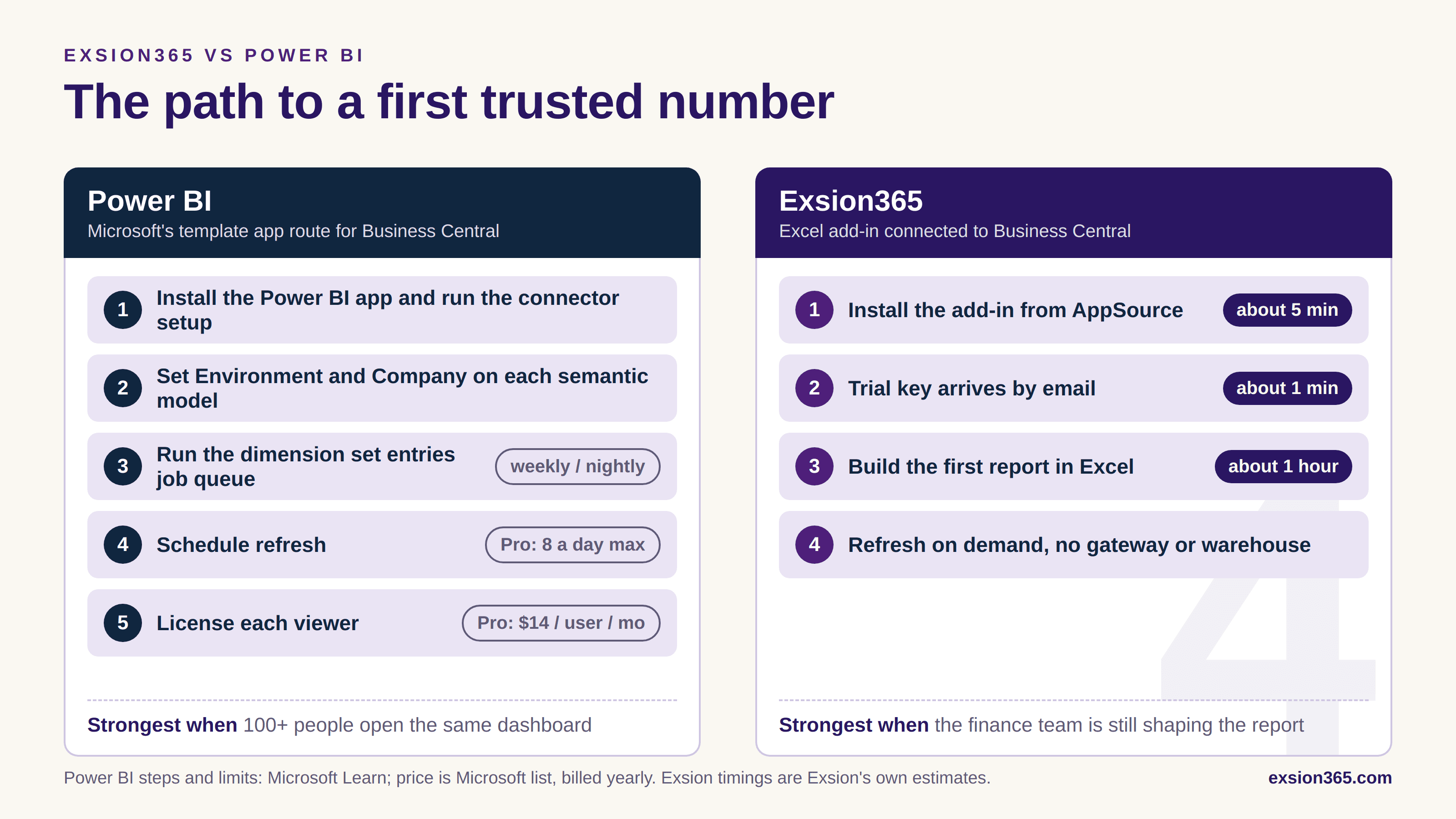
Figure: The path to a first trusted number. Power BI steps and limits per Microsoft Learn; Exsion timings are Exsion's own estimates.
Where Power BI is the faster path, and where it is not
Once the audience grows, the math changes. A hundred managers opening the same view on Monday morning are better served by one shared model than by a hundred workbooks, and Power BI is built for exactly that. It is also the natural home for report pages that have stopped changing.
The finance team gets live faster in Excel while the report is still being figured out. At Boro-Wide, a waste management company with about 12,000 customers, the CFO built a billing reconciliation report in a couple of days that he estimates would have taken consultants a couple of months and $5,000 to $10,000. He prototypes in Exsion, and once the logic is settled the report moves into Power BI as a dashboard. The teams that get live fastest are rarely the ones that pick a winner first. They use the tool with the shorter loop while the question is still moving.
There is also a hybrid worth knowing about. Microsoft lets Excel connect to those same Power BI semantic models, which helps if IT already runs them. The numbers in Excel are then only as fresh as the model's last refresh, so the eight-a-day ceiling on Pro still applies.
How to settle it in a week
Skip the demos and run a race. Choose one real report, such as a P&L by cost center for the last twelve months across two companies, and build it in both tools with a stopwatch. Note how long each takes to produce the first number your controller signs off on, and write down every person who had to get involved, not just the time on the clock. A first report that needed the finance lead, an IT admin, and a Power BI developer is a three-calendar problem even if each of them spent only an hour. Then ask for one change, say a new dimension split or an extra column, and time that too. The second timing is where the gap usually shows, because it measures who can make the change without asking someone else.
Count the people as well. Power BI's Pro license applies to every viewer of a shared report, so a team of fifty managers who only read prices very differently from five controllers who build. Ask each vendor how its licensing treats readers, and price the same headcount in both.
If you want a fair fight, run the Exsion trial next to whichever Power BI app or model you already have, and give both the same report. The result settles the debate faster than another comparison chart. The harder question comes in month three: when the request for a new cut arrives, who owns the change?
Frequently asked questions
[[FAQ_START]]
Is Power BI free for Business Central reporting if we already pay for Microsoft 365? | No. Everyone who opens a shared Power BI report needs a license, and Power BI Pro lists at 14 US dollars per user per month, billed yearly.
How often can a Power BI report on Business Central refresh? | Refresh has to be scheduled, and on Power BI Pro the schedule tops out at eight refreshes a day. Excel with Exsion refreshes on demand, every time you press the button.
How long does each one take to show your own data? | A Power BI app needs its environment and company parameters set and a job queue entry run before dimension set entries appear, which runs to days or weeks depending on who owns the semantic model. The Exsion add-in installs from AppSource in about five minutes and a first working report takes about an hour in our experience.
Which handles reporting across several Business Central companies? | Each Power BI app's semantic model points at a single company, so a group either repeats the setup per entity or builds a custom model. In Excel with Exsion you tick the companies in the query grid and one table returns with a company column.
Do we have to choose one or the other? | No. Microsoft lets Excel connect to the same Power BI semantic models, and some teams prototype in Excel and move the report into Power BI once the logic has settled. Numbers pulled from a semantic model are only as fresh as its last refresh.
What does Exsion cost next to Power BI Pro? | Exsion plans start at 245 euro a month for five licenses, with additional licenses at 15 euro a month and the ExsionTime scheduling add-on from 95 euro a month for ten scheduled reports. Power BI Pro is priced per viewer instead, so the comparison turns on how many people only read.
[[FAQ_END]]
Suggested reading

Building Excel-Native Reports for Microsoft Dynamics 365 Business Central: A Guide for CFOs and Controllers

General ledger checks in Excel without the hassle

Prevent data errors at the source in Business Central

How to Drill Down to Transactions in Excel for BC in 6 Steps (2026)
How to Build BC Management Reports in Excel in 7 Steps (2026)